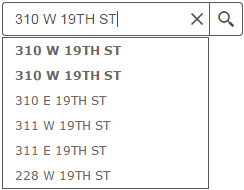
As you begin typing an address or street name in the text box, the geolocator will start displaying suggestions
in a drop down menu. The closest matches will be towards the top of the list.
Enter the address in standard United States postal code and abbreviation format with no apartment or unit
information.
If there are two identical matches found, like in the image below for 310 W 19th ST, the top address will be
the point on the location/building and the second address will be a point located on the street centerline.
When the desired address appears in the drop down menu, click on the address to pan/zoom to the location of
that address.
To geolocate a mile marker on an interstate, state highway or railroad, enter MM plus the number (no space
between the MM and the number) followed by the road or railroad name into the search box.
Examples:
Interstate: MM364 I-80 to search for Mile Marker 364 on Interstate 80
State Highways: MM7 STATE HWY 210 to search for Mile Marker 7 on State Highway 210
Railroads: MM505 UPRR to search for Mile Marker 505 on Union Pacific Railroad
To geolocate a coordinate, they must be in WGS84 projection which are the latitude/longitude coordinates typically provided by a GPS unit.
The coordinates must be in decimal degree format.
The coordinates must be entered with longitude first followed by the latitude and separated by a comma.
The longitude must be proceeded by a minus (-) sign. If there is no (-), the map will pan/zoom to the other side
of the world and the map will be empty.
To convert coordinates from degree/minutes/seconds format to decimal degrees, follow the links provided on the
Links page.